Learn
The workspace
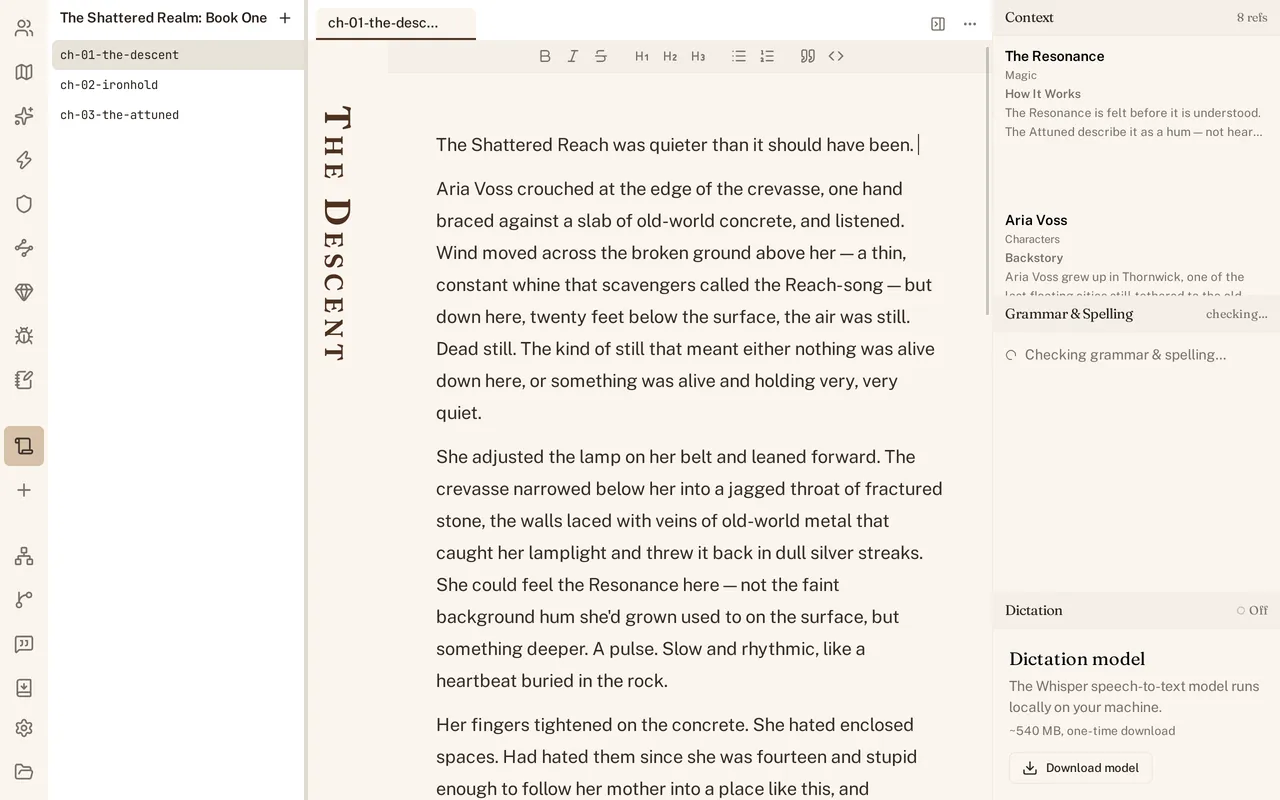
Tabs across the top, the navigation rail and a list panel on the left, and the dock on the right. What comes back when you reopen a project.
You can open, close and move between everything you have open, and every shortcut that gets you there without the mouse.
Tabs
Every chapter, character, the revisions page, a review, and anything else you open lives in its own tab across the top of the window. Click a tab to bring it forward. Cmd+W closes the one you are on; Ctrl+Tab moves to the next. Chapter tabs in the manuscript list render as rotated book-spine titles, and clicking one lets you rename it in place.
Open enough at once and the strip runs out of room. Past fifty tabs it stops trying to fit every title and overflows rather than shrinking each one into an unreadable sliver.
The left column
The navigation rail is the strip of icons down the far left: one per kind of world part (see Set up your world), one per manuscript with a + to start another, then Relationships, Revisions, Reviews and Export, with Settings at the bottom. Click an icon and a list panel opens beside the rail; click the same icon again and it closes. Click a different icon instead and the panel switches to that list rather than stacking a second one open. Only one list is open at a time.
The right dock
The dock is the column on the right: Context at the top, Grammar & Spelling below it, Dictation at the bottom. Cmd+Shift+B hides the whole dock when you want the width back, and the same shortcut brings it back.
What comes back when you reopen
Close World Builder mid-session and reopen the same project, and your tabs come back exactly as you left them, open to the page you were on. Open a different project instead and the tab strip starts empty; session state belongs to the project, not to the app in general.
Every shortcut
Cmd+W closes the current tab. Ctrl+Tab cycles to the next one. Cmd+B opens the Characters list, or closes whichever list is currently open in the left column. Cmd+Shift+B hides or restores the right dock. Cmd+, opens Settings. Cmd+Shift+D starts and stops dictation (see Dictation). None of them need the mouse.