Learn
Grammar and spelling
See spelling and cliche suggestions beside the chapter you are writing. Fix one, ignore it, or turn the rule off for this project.
You can read a suggestion, act on it in whichever way fits, and quiet the ones that do not apply to your project.
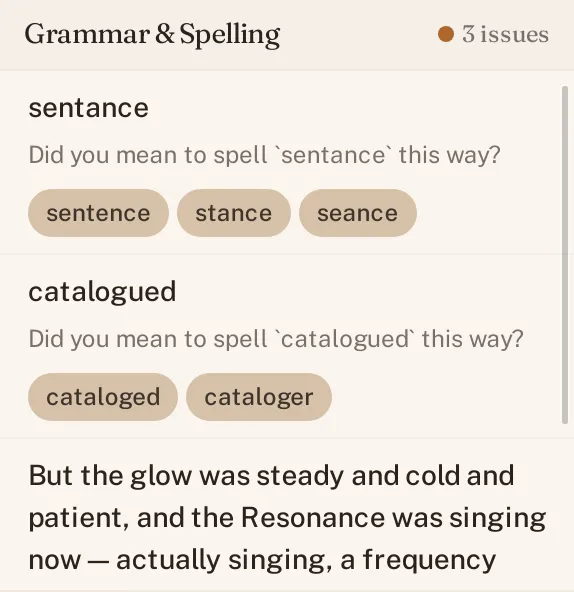
The six categories
Grammar & Spelling groups what it flags into six categories. Spelling is the one you will meet first, a misspelled word gets a short list of suggested corrections, ranked by how close they are to what you typed. Clichés is another: World Builder catches the phrases a copyeditor would circle, and calls them by that name, accent and all.
Fix, ignore, or add to dictionary
Every flagged word or phrase gets the same three options. Click a suggestion to replace what you wrote with it. Dismiss it and move on if it is not actually wrong. Or, for an invented name that keeps getting flagged as a misspelling, add it to your personal dictionary, once it is in, World Builder stops treating it as a typo, in this project and every other one.
Turn a rule off for this project
Not every category fits every project. Open Settings and find Grammar & Spelling, and you can turn a whole category off, cliche detection, say, if you are deliberately leaning on a few recurring phrases. The setting is per project, so turning a rule off in one world does not turn it off in another.
Suppressions
Dismissing one flagged instance is different from turning off a whole category. World Builder remembers what you dismissed, so the same word in the same spot does not come back to bother you the next time you open the chapter, while the rule itself keeps checking everything else you write.
See Editorial review for the deeper pass World Builder can run across a whole chapter or manuscript, beyond grammar and spelling alone.